For the training manager

Put the right people on the right courses, and show that the courses worked.

Every course says which Competency it raises, and from which level to which. Compazable matches that to what people actually need. You approve the seats and score what was learned, and the same Competency scores show whether it made a difference.

Shown as Ben Walker, Training Manager at Brightwave Technologies: a fictional company with 40 employees and two years of reviews. Every name and number is demo data.

A walk through your screens

In the order you would use them.

Step 1

Course catalogue

Each course names the Competency it raises, and from which level to which: its stated intent. That is how Compazable matches a course to a person's gap. Courses from an outside provider wait here until you confirm their stated intents and offer them.

What to noticeCustomer Focus Workshop raises Customer Focus from level 2 to level 4. Negotiation Skills Lab, from Westbridge Institute, is waiting for the Training Manager.
Brightwave Technologies · demo data
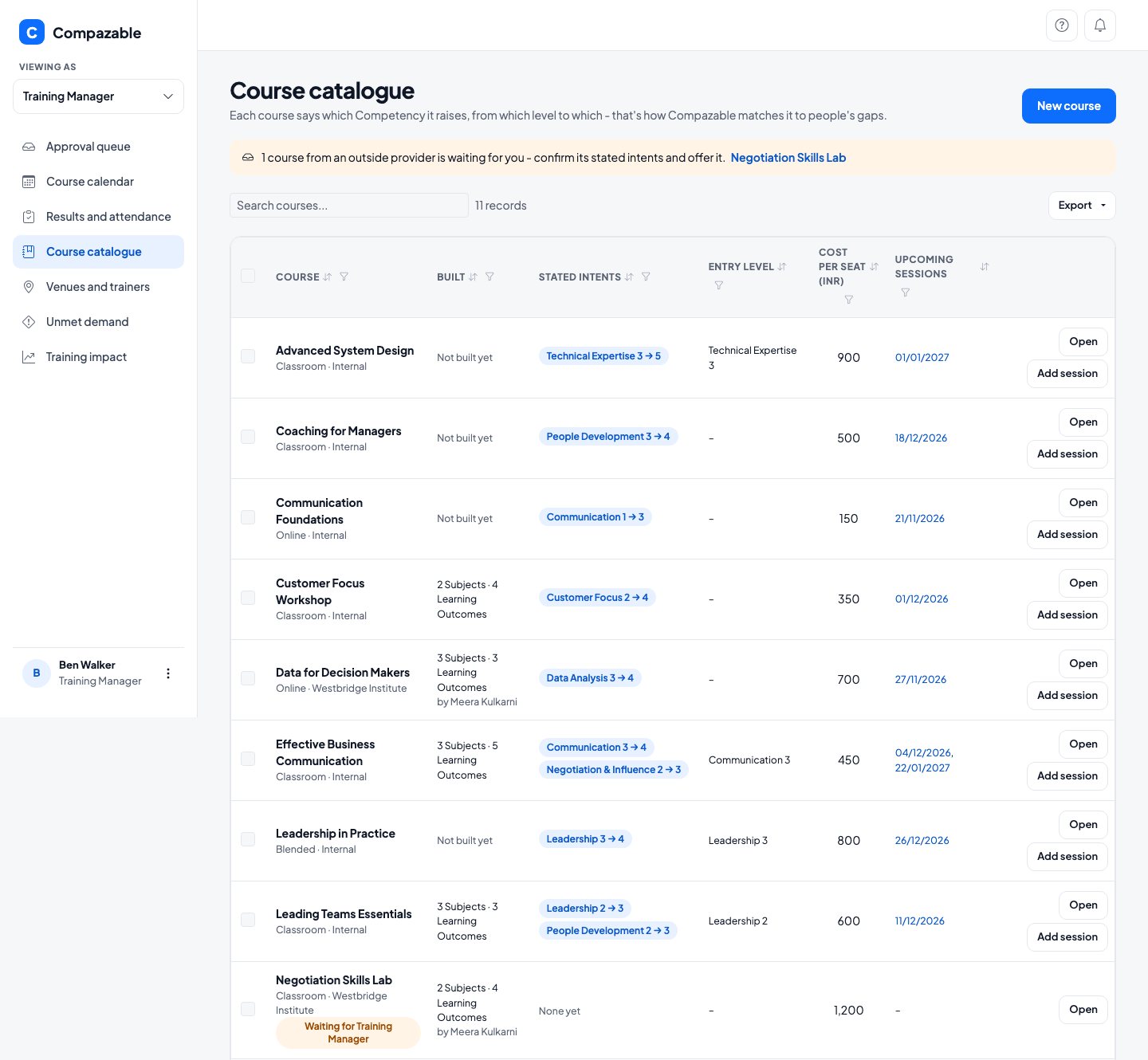
Course catalogue with eleven courses, each showing its stated intent, entry level, cost per seat and upcoming sessions, and a notice that an outside provider's course is waiting
Step 2

Approval queue

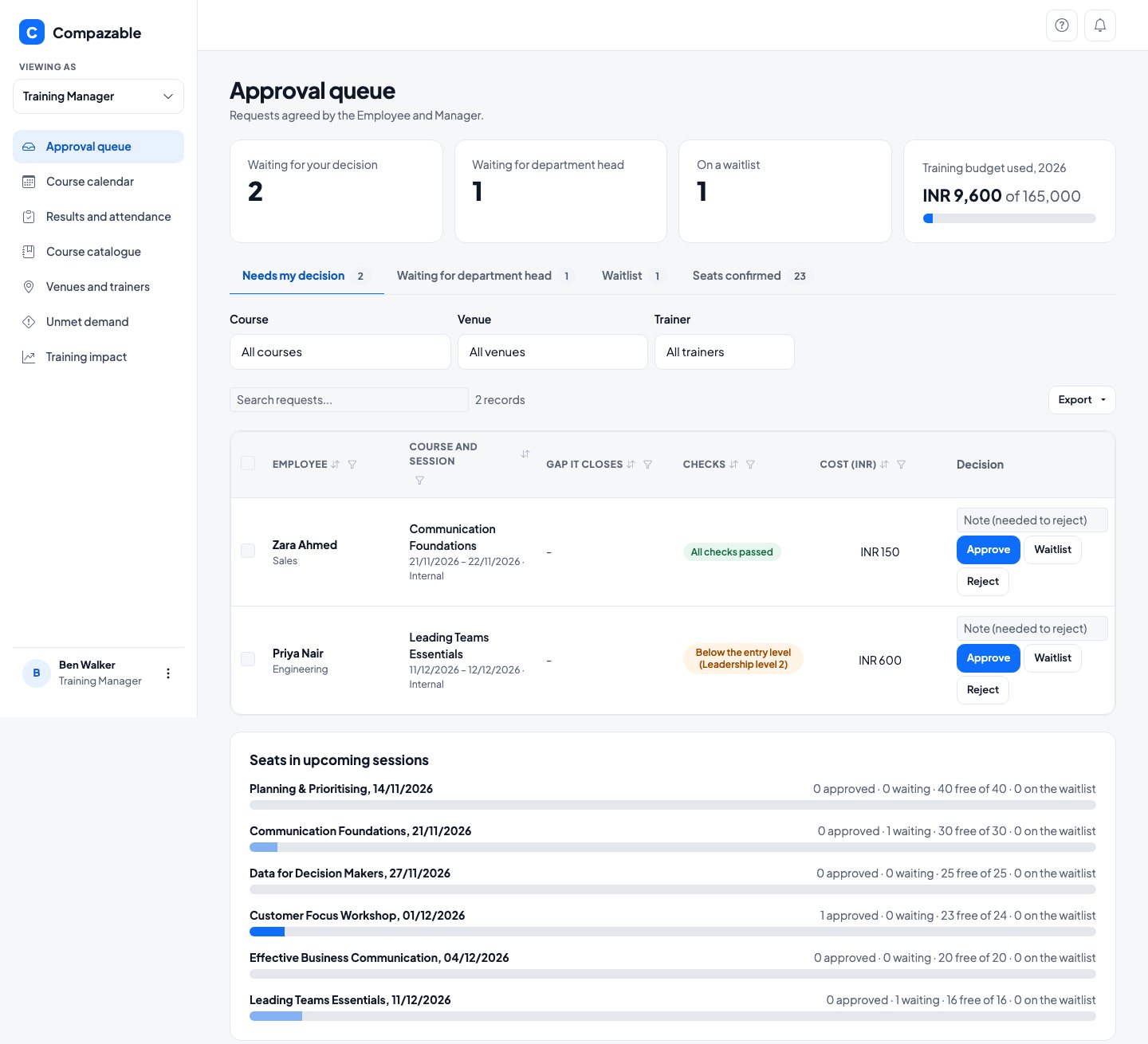
Requests arrive once the Employee and their Manager have both agreed. Each one shows the checks Compazable ran, so you can approve, waitlist or reject it with a note. Seats in upcoming sessions and the year's budget are on the same page.

What to noticeZara Ahmed's request passes every check. Priya Nair's is flagged "Below the entry level (Leadership level 2)" for you to decide. 2026 budget used: INR 9,600 of 165,000.
Brightwave Technologies · demo data
Approval queue with two requests waiting for a decision, their checks, cost and Approve, Waitlist and Reject buttons, and a bar for seats in each upcoming session
Step 3

Results and attendance

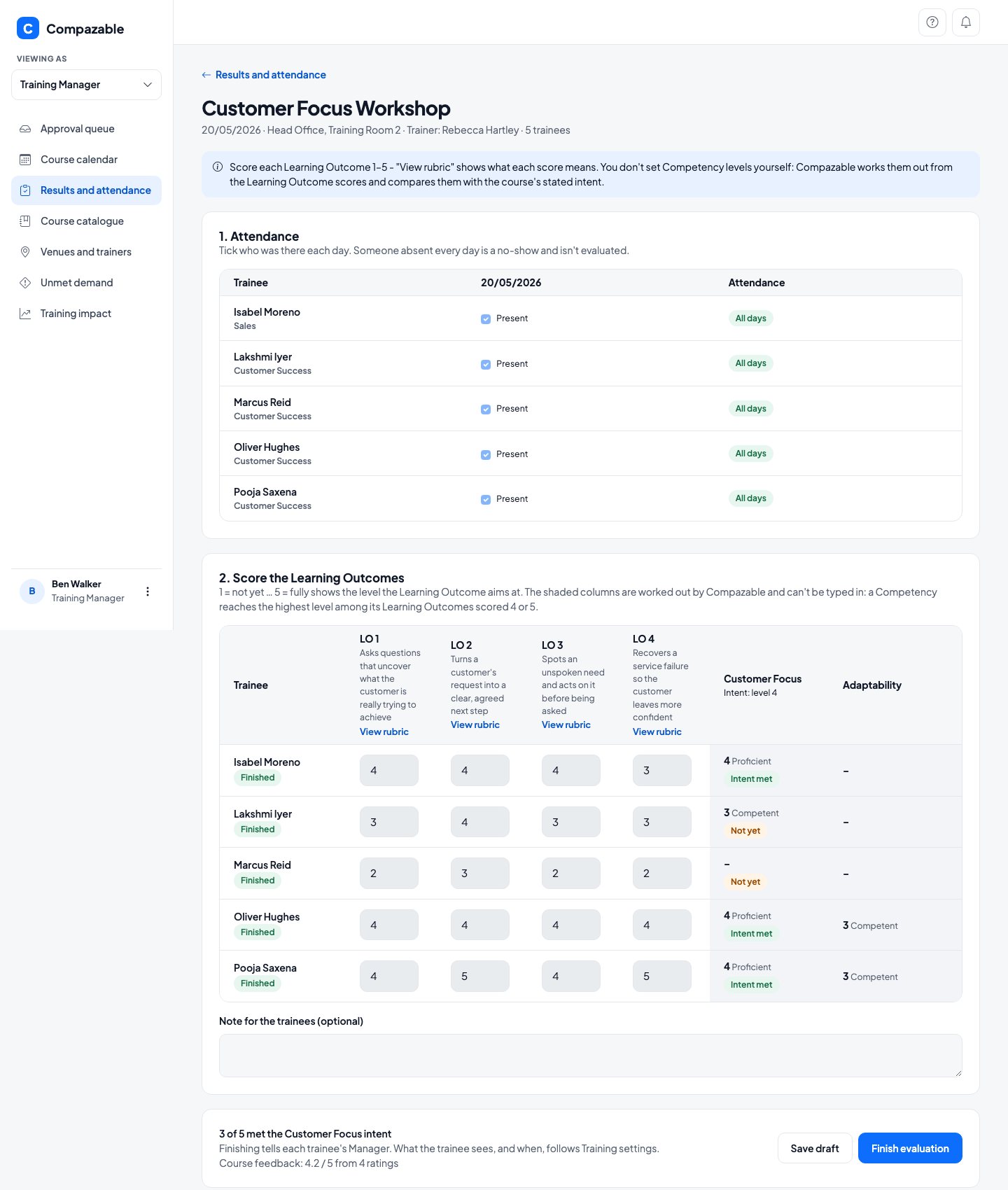
After a session, tick who attended and score each Learning Outcome from 1 to 5, with a rubric for what each score means. You never type a Competency level: Compazable works it out from the scores and compares it with the course's stated intent.

What to noticeIn the Customer Focus Workshop, 3 of 5 trainees met the stated intent. Isabel Moreno, scored 4, 4, 4 and 3, reached Customer Focus level 4. Marcus Reid, scored 2, 3, 2 and 2, has not yet.
Brightwave Technologies · demo data
Results page for the Customer Focus Workshop with attendance, a score from 1 to 5 for each Learning Outcome, and the Customer Focus level worked out for each trainee marked Intent met or Not yet
Step 4

Unmet demand

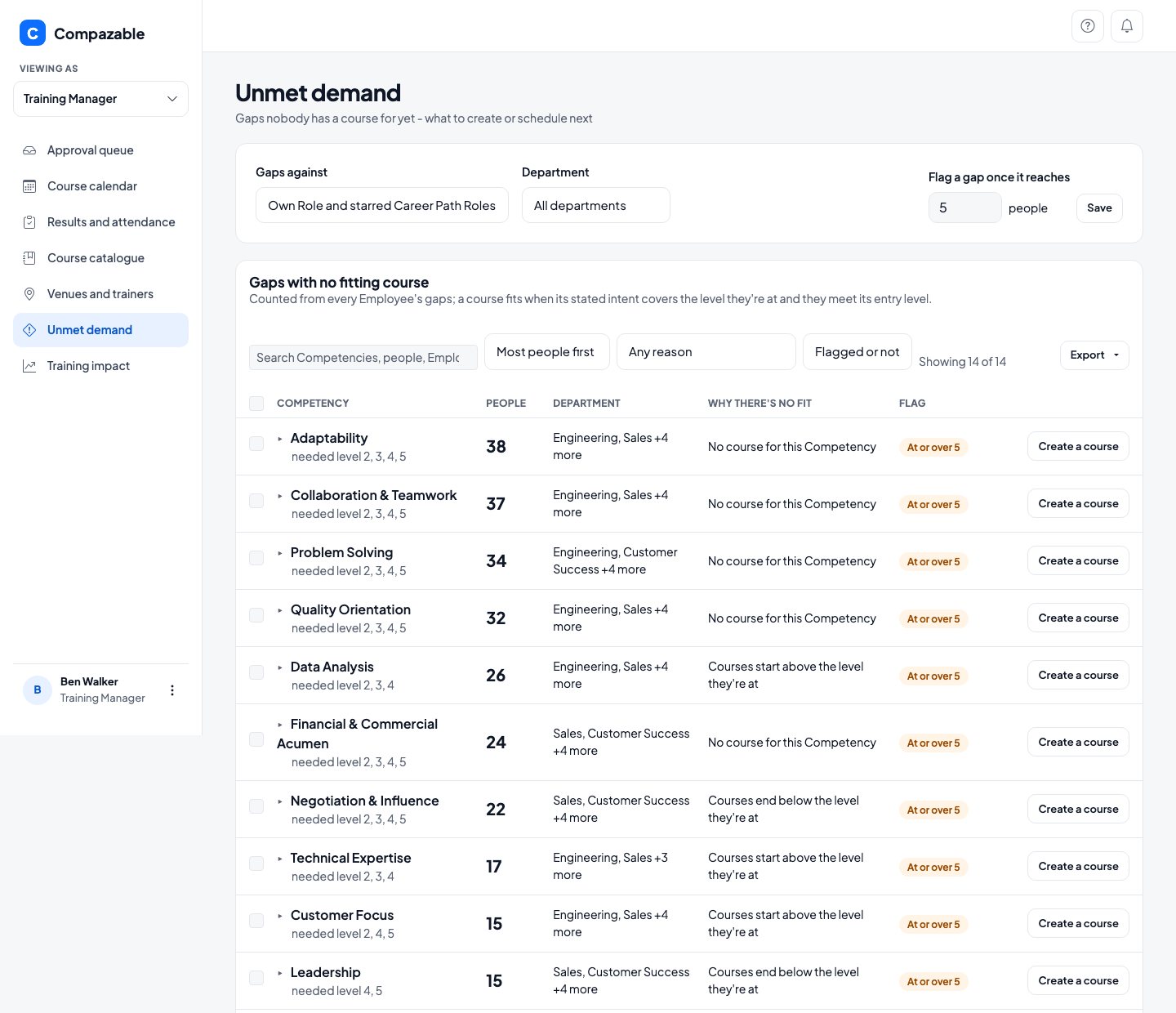
The gaps across the company that no course fits yet, and why: no course for the Competency, courses that start above the level people are at, or end below it. Create a course from the row. Below, courses with more people wanting a seat than seats.

What to notice38 people have an Adaptability gap and no course covers it. For Data Analysis, 26 people need a course that starts lower. A gap is flagged once it reaches 5 people.
Brightwave Technologies · demo data
Unmet demand list of Competencies with the number of people, the departments and why no course fits, each with a Create a course button
Step 5

Training impact

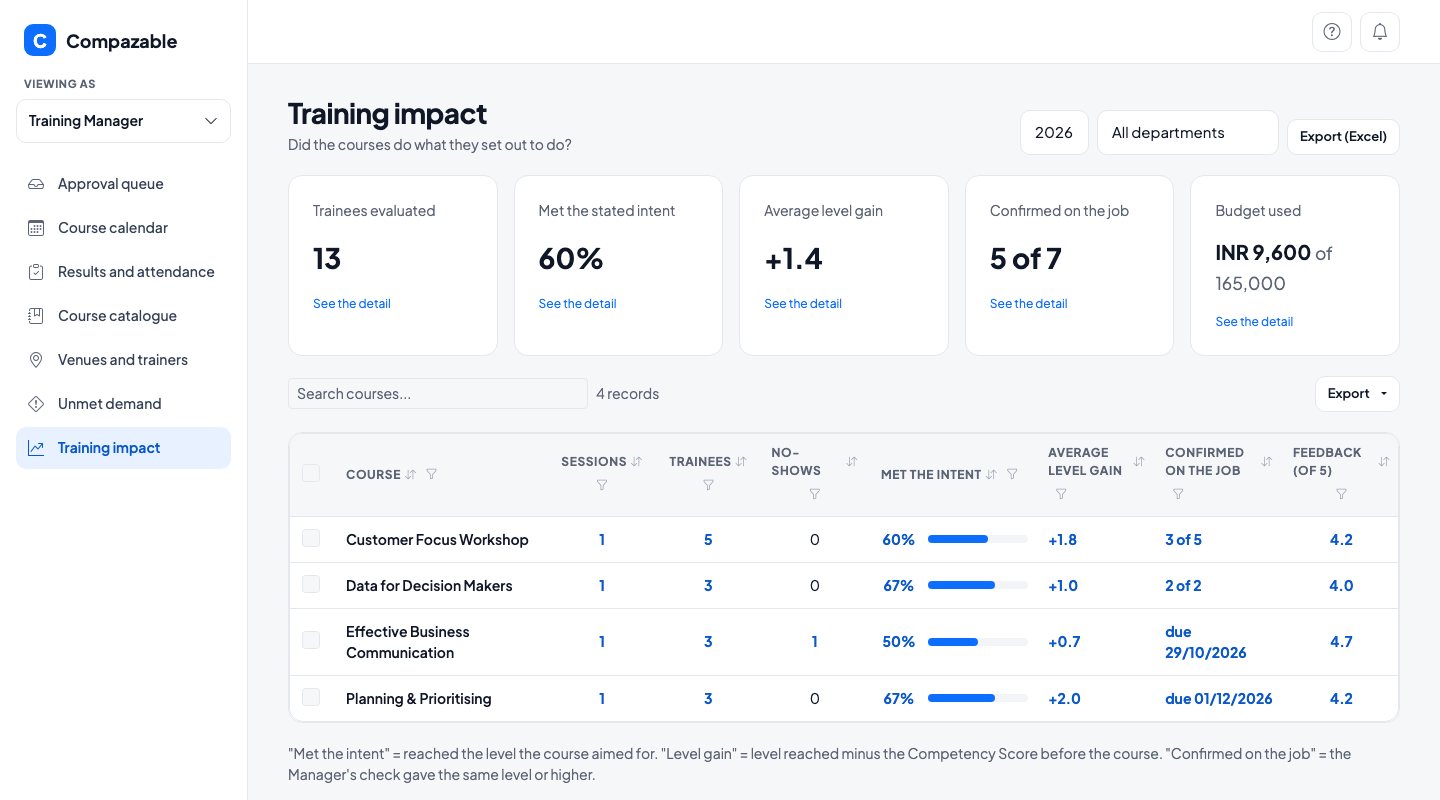
Did the courses do what they set out to do? For each course: how many trainees met the stated intent, the average level gained, how many a Manager confirmed on the job, feedback, and spend against budget. Every card and number opens the detail behind it.

What to noticeIn 2026, 13 trainees were evaluated. 60% met the stated intent, the average gain was 1.4 levels, and Managers have confirmed 5 of 7 on the job.
Brightwave Technologies · demo data
Training impact with trainees evaluated, the share who met the stated intent, average level gain, confirmed on the job and budget used, and a table by course
In short

What you can do, and what to know.

You can

  • Describe every course by the level it takes people from and to
  • Approve, waitlist or reject requests, with the checks beside each one
  • Score what people learned without typing a Competency level
  • See which gaps have no course yet, and create one from the list
  • Show whether a course worked, and whether a Manager saw it on the job

Good to know

A Training Manager works with courses, sessions, requests and results, and does not see Employee reviews. A company with several Training Managers can limit each to the sessions they look after. Settings and budgets stay with HR, and Employees never see what a course costs.

Get in touch

Put your company's competencies on the record.

Bring your own Roles and Competencies. A 60 minute working session built around your real setup, with no preparation needed on your side.

Filled in from the page you came from.